
Under Trees - ไดอารี่ส่วนตัว
เล่าความลับของคุณให้ต้นไม้ฟัง
Under Trees คือไดอารีส่วนตัวที่เรียบง่ายและเก็บข้อมูลไว้บนอุปกรณ์ของคุณ เขียนเรื่องราวในแต่ละวัน บันทึกอารมณ์ เพิ่มรูปภาพหรือวาดภาพสั้น ๆ และปกป้องทุกอย่างด้วยรหัสผ่าน — ไม่ต้องมีบัญชี ไม่ต้องสมัคร เพียงแค่ไดอารีของคุณบนอุปกรณ์ของคุณเอง
แอปไดอารีหลายแอปขอให้คุณฝากความไว้วางใจไว้กับคลาวด์ แต่ Under Trees เริ่มต้นจากแนวคิดที่ต่างออกไป เนื้อหาในไดอารีของคุณจะถูกเก็บไว้ในพื้นที่ส่วนตัวของแอปและได้รับการปกป้องโดยโทรศัพท์ของคุณ ไม่มีข้อมูลใดออกจากอุปกรณ์ เว้นแต่คุณจะเป็นผู้เลือกสำรองข้อมูลด้วยตัวเอง


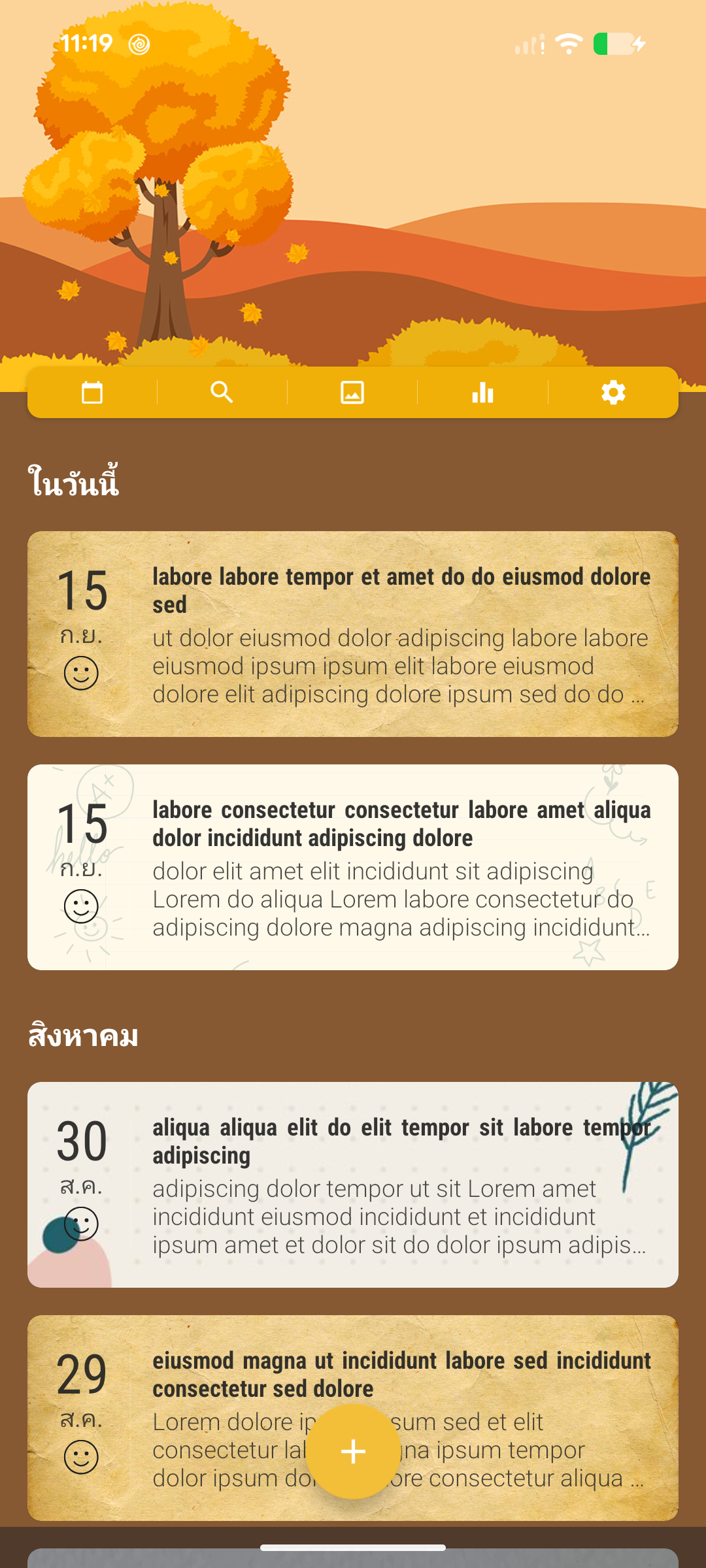
A quiet daily journal
Capture thoughts and moments without needing to create a user-facing account before you start writing.
Private reflection on the go
Open your journal even when connectivity is limited, then use the app lock to keep casual access away from your entries.
Look back with context
Use dates, tags, attached images, and moods to rediscover what happened and how you felt at the time.
คุณสมบัติ
ไดอารีที่ไปพร้อมกับคุณ
ไม่ต้องมีบัญชี ไม่ต้องเข้าสู่ระบบ — ติดตั้งแล้วเริ่มเขียนได้ทันที • ใช้งานแบบออฟไลน์ได้เต็มรูปแบบ — บนเครื่องบิน รถไฟใต้ดิน หรือที่ไหนก็ได้ • เขียนได้รวดเร็ว สะอาดตา และไม่มีสิ่งรบกวน • เขียนได้มากเท่าที่ต้องการ เมื่อไรก็ได้
เก็บไว้เป็นเรื่องส่วนตัว
ปกป้องไดอารีด้วยรหัสผ่าน • ปลดล็อกอย่างรวดเร็วด้วยข้อมูลชีวมิติ • ล็อกอัตโนมัติเมื่อแอปทำงานอยู่เบื้องหลัง • ตั้งคำถามเพื่อความปลอดภัยไว้สำหรับกู้คืนการเข้าถึงหากลืมรหัสผ่าน — ไม่ต้องรออีเมลรีเซ็ต • ข้อมูลของคุณอยู่ในพื้นที่จัดเก็บส่วนตัวของแอปและได้รับการปกป้องจากแอปอื่นโดยระบบปฏิบัติการ
ทำให้เป็นสไตล์ของคุณ
ธีมฟรี พร้อมเครื่องมือสร้างธีมด้วยสีและพื้นหลังของคุณเอง • เลือกแบบอักษรที่เหมาะกับคุณ • เทมเพลตสำหรับเริ่มเขียน: ท่องเที่ยว อาหาร ดูแลตัวเอง การเรียนรู้ และความขอบคุณ • ข้อความยืนยันเชิงบวกแบบเลือกใช้ได้ที่จะต้อนรับคุณเมื่อเปิดแอป
มากกว่าข้อความ
เพิ่มรูปภาพจากแกลเลอรีหรือกล้อง • วาดภาพสั้น ๆ ได้โดยตรงในบันทึก • ใช้เสียงของคุณด้วยฟีเจอร์แปลงเสียงเป็นข้อความในตัว
ค้นหาอะไรก็เจออย่างรวดเร็ว
ค้นหาจากเนื้อหาหรือแท็ก • ดูบันทึกผ่านปฏิทิน • จัดระเบียบด้วยแท็กและตัวจัดการแท็ก
ย้อนดูว่าคุณรู้สึกอย่างไร
ตัวติดตามอารมณ์แบบเรียบง่ายที่อยู่ในปฏิทิน • ดูการเปลี่ยนแปลงของอารมณ์ในช่วง 30 วัน 3 เดือน หรือตลอดช่วงเวลา — รวมถึงแยกตามแท็ก • “วันนี้ในอดีต” นำความทรงจำเก่า ๆ กลับมาให้คุณอีกครั้ง
สำรองและส่งออกข้อมูล ในแบบของคุณ
สำรองไปยังโฟลเดอร์แอปใน Google Drive ของคุณเอง หรือเก็บไว้ในโฟลเดอร์บนอุปกรณ์ • กู้คืนบนอุปกรณ์อื่นด้วยบัญชีเดียวกัน • ส่งออกบันทึกเป็นไฟล์ .txt หรือ PDF เพื่อพิมพ์หรือเก็บไว้ที่ใดก็ได้ตามต้องการ
การแจ้งเตือนแบบนุ่มนวล
การแจ้งเตือนแบบเลือกใช้ได้เพื่อช่วยเตือนให้คุณเขียน • ปรับแต่งได้เต็มที่และปิดได้ทุกเมื่อ
ความเป็นส่วนตัวและความน่าเชื่อถือ
- บัญชีเป็นทางเลือก
You can use the app without an account unless you choose a feature that needs sign-in.
- Local data on your device
Core journal content, attached media, tags, affirmations, themes, security settings, reminders, and preferences are stored on your device. Local journal and media storage is not encrypted by the app passcode. You can remove it by uninstalling the app or clearing app data.
- Limited off-device data may be processed
Some limited data may be processed off-device for app functionality, account management, and analytics. Optional features such as Optional Google account information and Optional Google Drive backup may process additional data off-device for app functionality and account management.

คำถามที่พบบ่อย
Does Under Trees work without the internet?
Yes. Writing, reading, searching, calendar browsing, tags, themes, moods, and other core journal features use data stored on your device. Internet access is still needed for ads, purchases, analytics and diagnostics, remote configuration, app updates, and optional Google Drive backup.
Is an account required to start writing?
No user-facing account is required for the local journal. Google sign-in is optional and is requested only when you choose Google Drive backup and restore. The app may also use an anonymous Firebase identifier for supporting services.
Where are journal entries stored?
Entries, tags, affirmations, and attached media are stored locally in the app's private storage. Nothing is backed up to Google Drive unless you explicitly sign in and create a Drive backup.
Does the passcode encrypt journal content?
The passcode and supported biometrics protect access through the app interface. They do not encrypt the journal database, media files, or backup files. Keep local and Drive backups in a place you trust.
How do backup and restore work?
Open Backup / Restore and choose a local folder or Google Drive. A local backup stays in the folder you select. Drive backups are placed in Google Drive's app-specific data area after you sign in and authorize access. Restore replaces the current local journal, so keep a current backup before restoring older data.
What do Free and Premium include?
The core journaling experience is free because writing things down should be for everyone. The free version is supported by ads. Premium is optional. It removes ads and unlocks extra customization, including image and color note backgrounds. Choose a yearly subscription or a one-time Lifetime purchase.
Can journal entries be exported?
Yes. Export entries as .txt or PDF files to print or keep wherever you like.
Is Under Trees Offline still being developed?
Yes. Active development has resumed, with ongoing work focused on improving the offline-first journal experience, reliability, and data portability.
Under Trees. เล่าความลับของคุณให้ต้นไม้ฟัง
ไดอารีอาจมีความหมายมากสำหรับเจ้าของ และเข้าใจเรื่องนั้นดี หากต้องการความช่วยเหลือ ส่งอีเมลมาได้ทุกเมื่อที่ support@langhoangal.dev — ทุกข้อความจะได้รับการอ่านและตอบด้วยตัวเอง
ประสบการณ์หลักในการเขียนไดอารีใช้งานได้ฟรี เพราะทุกคนควรมีโอกาสได้เขียนสิ่งที่อยู่ในใจ เวอร์ชันฟรีสนับสนุนด้วยโฆษณา Premium เป็นทางเลือก คุณสามารถใช้เพื่อลบโฆษณาและปลดล็อกการปรับแต่งเพิ่มเติม รวมถึงพื้นหลังโน้ตแบบรูปภาพและสี เลือกได้ทั้งการสมัครสมาชิกรายปีหรือการซื้อ Lifetime แบบจ่ายครั้งเดียว